
Removing barriers to MEANINGFUL technology use! 

Educational Tranformation Brian Yearling Educational Tranformation Brian Yearling

Stop Overwhelming Educators: Tech Coaches Need to Slow Their Roll

In the lightspeed paced world of educational technology, I appreciate the need for finding fresh ideas, presenting unique content, and reviewing new tools.  I work to maintain two blogs, keep a Twitter and Google+ feed that is somewhat relevant, and stay on top of my game as I talk with teachers each day.  It's a challenge anybody who is actively publishing for and working with an audience deals with daily.

What I worry about is the bubble of separation that clearly exists between those of us who love, live, and breathe technology's role in education, and those practitioners we work with daily who don't share our passion and commitment to keeping pace with new ed tech tools.  If our goal as Tech Coaches is the pursuit of improving the educational experience of our students, not just finding the latest and greatest web tools and funky apps, then we need to confront the gap between where we live in our passion for educational technology, and where the rest of the world lives, and then determine the best way to meet our staff where they are and to provide them with the information and tools that they need to be successful.  

One of the first places to start, then, is the promotion of new tools and services.  We've all read the blogs, heard the podcasts, and seen the tweets that offer a cursory look at some "amazing" new tool that the promoter has yet to really test, use, or meaningfully evaluate.  I wish this was just a once in a while occurrence.  Sadly, it isn't.  In the excitement of newness and possibility, there is no shortage of people recommending services and apps that they have yet to put through the paces.  It is apparent in their commentary, their shallow number of practical examples, and their failure to present th cons of that tool.  I have yet to find a tool that does everything that it is asked to do -- it's just the reality that these tools cannot be everything to everybody.  Yet, in these reviews, the "downside" of the tool is rarely reported. 

While this race to promote new tools isn't that big of a deal on the surface, it points to some larger issues.  

The first is that the promotion of these tools without meaningful testing and evaluation is just poor practice. Many tech coaches have advocated for meaningful planning and testing before using any tool with students in the classroom.  Perhaps we have to swallow a bit of our own medicine and withhold recommendation of any tool until we have put it through the paces ourselves.

The second point is that we have more important work to focus on than just announcing the newest tools.  The meaningful work of coaching is in finding innovative and powerful uses of these tools in the classroom with real students.  This is not to say that these stories aren't making their way to publicaion -- they are.  It is simply to say that examples of practical uses of tools are the blog posts and tweets that will most meaningfully inform practice.  I think of one of my favorite software applications -- Microsoft's Photo Story.  With one incredibly easy to use application, I saw more powerful, significant demonstrations of learning come from a wider mix of secondary and elementary classrooms than almost any other software application I can think of.  That was Photo Story's #Eduwin, long before Twitter came to existence.  That's an example of the important work Tech Coaches must focus on -- finding the innovative, inspiring, unique uses of the core tools we have available to us.


The third point is that one of our primary roles is to help focus those colleagues who are less interested in the latest and greatest tools -- to provide them with a tool set that is agile, adaptable, dependable, and easy to utilize.  Most Technology Coaches already have a base toolset that we recommend and default to whenever we work with staff.  It is apparent that one of our core responsibilitiesis to keep an eye on the horizon, always searching for new and better tools.  What we need to guard against, though, is prematurely recommending tools to others that haven't found their way into our toolset on some level.  We need to provide the BEST tools to our students and staff, not just the newest.  In doing so, we may beset serve our colleagues by being the barrier between what's new and what works.  That's a careful line of distinction that we can both define and influence.  However, there is a professional responsibility in helping to define that line.  That's where we have to be just a bit more careful in too quickly recommending or promoting the latest and greatest.


Remember that our target audience is our staff, most of which could care less whether Google or Apple introduced some new feature or app in the last hour. Many of them are already swimming in the bombardment of new tools, terms, passwords, and techniques.  Many are overwhelmed by the changing face of professional evaluation, accountability, teaching techniques, the introduction of the Common Core standards, and all of the other changes taking place in education today.  While educators are certainly professional enough to handle the pace of change in educational technology, with both our passion and knowledge of what to look for in these tools, it is our professional responsibility as Tech Coaches to assist our colleagues in sorting through the latest and greatest tools to find and promote only those tools that will make the educational experiences of our students the best that they can be.  That's why we need to slow our roll and stop recommending things just because it made the company's new blog post, and instead put those new tools through some appropriate testing b

efore publishing them to our larger audience.

This seems to be the real work -- the meaningful work -- of being a Tech Coach.

Read More
1:1, BYOD, Educational Tranformation Brian Yearling 1:1, BYOD, Educational Tranformation Brian Yearling

Bring Your Own Technology - What does it all mean?

On Wednesday, March 27th, Brian will be presenting to the Parents United Consortium in Waukesha, WI. This group is focused on providing educationally relevant information to parents in a consortium of local districts on a wide variety of educational topics.


The presentation will be focused generally on one question -- "Why do schools feel compelled to introduce a Bring Your Own Technology or 1:1 Technology initiative into the educational environment?"

I'm sharing my presentation here for those of you who have the same questions for your school administrators.


The presentation emphasizes five key areas:


  1. The World Has Changed...Schools Need to Change to Prepare Students for It (Academic Achievement is No Longer Enough)
  2. Schools Have to Provide Greater Digital Access -- Which models exist (Labs, Bring Your Own, or 1:1) and which is right for your school/student?
  3. The Great Device Debate - While we can get hung up on device selection, understand that we want to find the tool that can do the most, works best in our environment, and supports our educational needs.
  4. Cloud Services and Open Educational Resources - These are tools that change the opportunities for learning for students and teachers, and can be used for meaningful redefinition of what constitues education/learning.
  5. Changing Roles of Educators - The traditional vision of a teacher that controls the flow and depth of the lesson is quickly becoming outdated.  Many teachers realize this, but we have to give them room to grow into the new model of what a teacher can become.


I'm eager to share the presentation with those of you who are interested in viewing.  If you choose to use it with others, attribution is requested.

Please feel free to answer the polls and offer your thoughts!  


Here is a link to the presentation: http://portal.sliderocket.com/BNPBJ/BRING-YOUR-OWN-TECH


Read More
Educational Tranformation Brian Yearling Educational Tranformation Brian Yearling

Survey Says Freshmen Find Blackboard Resources Helpful

Growing use of Blackboard, the district's Learning Management System (LMS) has sparked conversations about the actual value Blackboard can add to the teaching and learning experience.  Nicole Land, an English Teacher at West High School, has provided some insight on the topic, asking her students how they feel about using Blackboard.

At West High School,  each teacher is maintaining a Blackboard course for each face-to-face course taught.  Within the course the instructors provide students (and their parent(s)/guardian(s)) access to a  course-focused Google Calendar, access to resources and assignments for the course, and possibly even some multimedia content related to the course.    While the implementation is in its earliest stages at West, students are already adapting and responding to the availability of the resources digitally.

Land recently asked 40 of her Grade 9 students enrolled in the West House (a pilot of a traditional "house" structure where teachers co-plan, co-teach, and converse about student progress with a cross-curricular emphasis) how they are using and feeling about the Blackboard course she maintains. There responses add some clarity to the question of how a resource like Blackboard can impact the learning experience for students.

Reviewing the Responses

Question:  What do like about the Blackboard 9 English site?
Points to consider:

  • 40 % said they like the calendar, indicating that these students appreciate clarity about what is planned for and expected of them
  • 38% of the student indicated that they like that they like how the site is organized (25%) or say that it helps them with homework (13% -- orange)
  • Only 5% of the students said "Nothing", although it was an available survey option
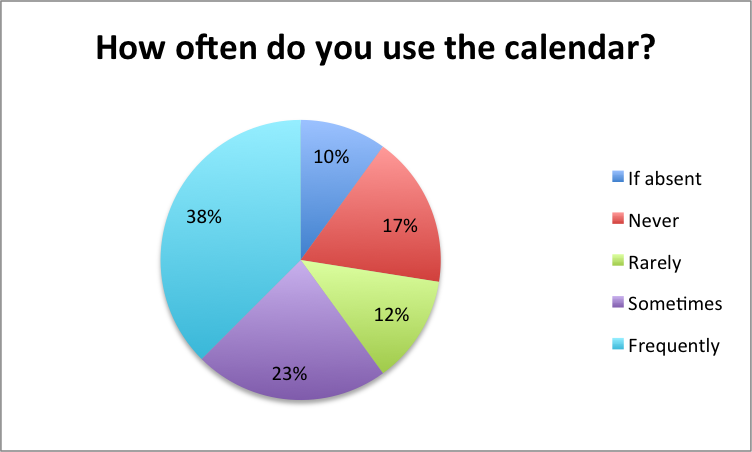
Question:  How often do you use the calendar?
Points to consider:
  • 61% of students said that they use the course calendar "Sometimes" (23%) or "Frequently" (38%) -- an indicator that students are engaging with the course calendar even though it is not required
  • 10% of students report using the calendar if absent, a sign that students take responsibility for missed coursework if required to

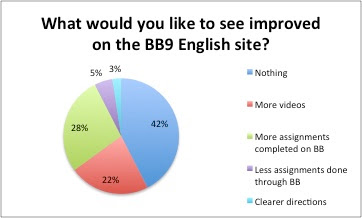
Question:  What would you like to see improve (or more of) on the Blackboard 9 English course?
Points to consider:

  • 22% of students asked for more videos to be available -- a possible sign that some students prefer instruction delivered in a "flipped," on-demand model
  • Only 3% of students asked for "Clearer Directions" on the course, suggesting that students have sense of what they are asked to do when engaging with Blackboard content
  • 42% of the students surveyed were seemingly content with the organization of Blackboard, as they suggested nothing needed to be improved at this time
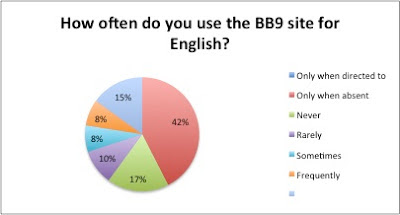
Question:  How often do you use the Blackboard 9 course for English?

Points to consider:

  • The results suggest that students are not presently accessing Blackboard consistently as a critical source for interacting with instructional content
  • The data may speak to the lack of consistently accessible technology for students to access a Blackboard course in as needed in the classroom
While the data collected may not be earth-shaking or surprising, it lends some evidence that students find value in resources that are made available to them in an on-demand, digital outlet such as Blackboard.  With the ever-present societal suggestion looming that young adults today are disengaged and lack educational commitment, embedded within Land's students' responses is an dissenting opinion -- one that suggests making learning resources available to students in alternate ways is accepted and valued by students.
As momentum for Waukesha One, a personalized learning platform being investigated in the School District of Waukesha, grows, teachers, like Land, who are investing significant time and energy into developing their coursework in Blackboard 9 will be rewarded as more students come "online" with more access to resources daily.  Fortunately for Land, by listening to what her students have to say about the experience they are having in the online course today, she'll be in a stronger position to develop an even better online experience for her students in the future.
Read More