

Removing barriers to MEANINGFUL technology use!
The e-Submission Insanity: Taking Control of Digitally Submitted Work -- Part 1

An example of a Google Drive folder when students have used a
a standard file naming convention to submit work.
There are tradeoffs for everything.
The "paperless" world of electronically submitted assessments/homework is truly a gift for those of us who struggle to keep tabs on the zillion+ sheets of paper we collect each year.
Yet, the tradeoff is having to develop a new system for management of our digitally collected student work. For many educators initially encountering Google Drive, or other collection tools for electronically submitted work, you may have this overwhelming feeling that your digital work environment is no more functional than a cluttered work space in the physical world.
Ready yourself for the good news! By adopting a few simple strategies, and by training your students to use those strategies religiously, you can regain your own sanity and become far more efficient in collecting and providing feedback on digital assessments.
Developing a Consistent Naming Convention
For many teachers, the process of paper collection has become a carefully crafted venture, At the very least, most teachers have a protocol for students when it comes to turning in physical papers. Name on the upper right of the page. Hour, period, and/or date just below that. Top left margin has assignment name. For many teachers, a similar naming/identification process has become the only way to keep tabs (and our sanity) on the flood of paperwork we consume regularly.
The movement to a digital collection platform will not shirk the need for a digital naming/identification equivalent. In fact, without identifying some sort consistent convention, and then STICKING TO IT, you may not be able to take advantage of some of the other niceties of digital collection (automatic time-stamping when assignments are collected, search and sort functions to easily find text within specific documents, and more).
The most beneficial naming convention in a digital platform is one that places the critical data in immediate view of the teacher without having to open the file/document to find the data. Generally this is done best in the document's name.
One example of a properly named document might be:
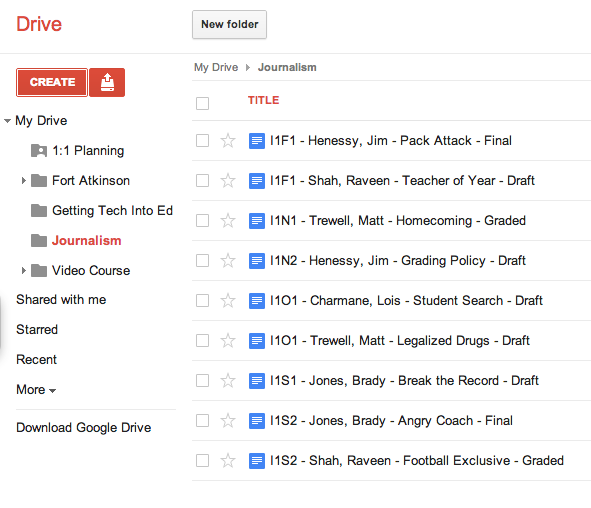 An example of a Google Drive folder when students have used a a standard file naming convention to submit work.
|
What is an assignment code? |
- The teacher is "under the gun" to provide prompt responses, so he/she is constantly opening files to see the status of the work (many kids will submit the work to you before it is done...we'll talk about that as well in a follow-up post). Much of that work is incomplete, leading to teacher frustration, and/or wasted teacher time. In this scenario, we've lost all of the efficiency of a digital turn-in system.
- Response time to student work is dramatically hampered because the teacher sets an arbitrary date for "review and response" to maintain sanity. As a result, students fall into the same old habits of waiting until the last minute to complete work. We've now lost momentum and enthusiasm for a more personalized, fluid turn-in system. This system is truly no different than a system where students turn in work physically on the due date and await the teacher response.
- Draft: This meant that the student had not completed the work and was not awaiting my feedback as an instructor. For me, this meant that I did not need to open that document and offer feedback at this time, unless the student communicated with me personally and asked for assistance.
- Final: This meant that the student had "completed" the work and was awaiting my feedback. As soon as I saw "Final" in the title, I opened that document and began to comment and assess. I did this even BEFORE official due dates, as the student was indicating he/she had submitted his/her best work at that time.
- Graded: I renamed the file "Graded" when I was finished offering feedback to the student. It was an indication to the student that there was some level of feedback in the document for the student. Even if I was sending them back to complete another draft with revisions, I indicated graded. When the student switched the work back to "Draft," I knew that the student had accepted my comments and was going to try again. Other students accepted the grade that I offered and elected not to revise, leaving the code "Graded."
As always, you will have to flex for some students. Be aware that some students are having their own struggles adapting organizational strategies to a digital world. The most important factor in all of our work is student learning -- a rule or naming convention should never get in the way of a student demonstrating what they have learned. Flex when you need to. Getting 95% of the students on board with your system will make managing the unique cases more palatable.
Advanced Google Search - Finding Reading Levels of Resources
I'm going to disturb and unsettle some Library Media Specialists here for a second (I'll redeem myself in a bit), so please stick with me.
Most people think they generally know how to search the web. In fact, some of us think we are pretty good at searching the web and finding valuable resources. However, when you look at the tricks and tips most of us actually employ to complete those searches, it's actually pretty unimpressive and without much strategy. Sadly, those unimpressive search strategies are the exact same strategies we "relay" to our students if educators don't take a more progressive view of systematic digital resource research.
The harsh reality is that most of our searches start with Google. And so do most of our students. While we may wish they started in databases (or at least proceeded to them in deeper research), they typically do not. I challenge all of you who have the luxury (sadly it has become that in so many schools) of a Library Media Specialist available in your building to help you rethink that approach when teaching research to your students. These folks are experts in this area and can really jump start some high quality ideas and lessons that will be invaluable to your students today and in the future.
Let's say, though, that we were to stick to Google alone. Did you know that Google has an Advanced Search feature that really drills down into some focused and interesting results.
I'm going to let another Waukesha instructor, West's Mark Grunske, share his nifty little tip about using Google's Advanced Search to find appropriate resources on the Internet based upon the reading level. As you visit Mark's blog, you'll see the details of how to do this. Go and try it yourself. And in doing so, you'll see lots of other Advanced Search options that may make you see how valuable having a little bit more systematic, advanced search strategies (even in Google) can be in finding the digital information you REALLY want!

From Mark Grunske's blog:
"This month's Google tip deals with finding appropriate readings for students at different reading levels........
When I first saw this trick, I immediately thought of all of our work in AO as well as the current leveling in Science and the similar changes coming to English and Social Studies............To search Google for sources sorted by reading level all you have to do is the following......."
Read the rest of the article at Mark's blog - Google, Gadgets, and Grunske - Reading Levels.
And again, visit your Library Media Specialists to start exploring how we can teach kids to be better "seekers" and "finders" of information. In a world where everything is digital and the accessibility to information continually explodes, these critical skills are as an important as being able to read the resources once our students have found them.
Shrinking the World for Middle School Students
With a great idea, a lot of passion, and the daring willingness to try something new, the seemingly "impossible" has become a reality, and has made a very clear impression on some of Central Middle School's students.
Through the use of Skype, a popular video conferencing solution, Ann Zindler's Readers' and Writers' Workshop students were able to make a deeper connection to an author they were studying in class -- an author who just happens to live in the United Kingdom.
"[On December 4th], seventh grade students at Central enjoyed Skyping with the author of one of our literature circle books, Payback. Rosemary Hayes, at the request of four of my students, spent about 40 minutes chatting from Cambridge, United Kingdom with our kids who read her book. [The students] prepared several questions and took turns speaking with her about her writing process and passion for writing, her research, and specifics about the characters upon whom she based her novel," Zindler said.
The technology used to accomplish the task was fairly standard and simple to set up. Zindler installed Skype on her school desktop computer. Using the document camera that Zindler uses for other classroom instruction as her web cam, and using a fairly inexpensive set of computer speakers and microphone that was available from the Central library, the stage was set for the event.
The real work, though, was done by the students. They were responsible for reading Hayes' book, discussing the work through the structure of a literature circle, and then preparing questions and comments for the author in advance of the actual Skype call. All were critical elements in preparing for the actual meeting with the author.
And how did the kids feel about the opportunity to interact with an author? Here is the collective reflection from Zindler's students: Wendy F., Jesica C., Kelsey N. and Brianna O.
"Meeting an author can be a once in a lifetime chance. When Ms. Rosemary Hayes, of Cambridge, England, author of Payback, asked us if we wanted to meet through Skype, first we were surprised she even answered our email. When we opened the email that she sent us, we literally started jumping up and down.
"Meeting her was amazing. Some of us have met other authors, but hadn't even read that particular author's books before meeting him or her, so we didn't get as much out of it. Since we had read Ms. Hayes book we had many questions and so did other kids who had read the book and joined our Skype. After we were done and all of our questions were answered, I understood the book a whole lot more and understood why she wrote it the way that she did. It's an amazing way to meet an author."
Like any technological tool that can be used in the classroom, the effectiveness of Skype to connect with the author is directly related to the quality of instructional planning and delivery by the instructor, and the commitment and engagement of the students to embrace the opportunity. As Zindler and her students have demonstrated, the proper infusion of technology into the classroom can make for some unforgettable experiences for our students.
If you are interested in learning more about how to Skype an author in your classroom, view the Skype an Author network website: http://skypeanauthor.wetpaint.com